Forecast future token cost and usage from your OpenAI or Anthropic billing CSV exports
Upload OpenAI or Anthropic exports. We auto-detect the format and immediately generate projections.
Export Steps
OpenAI usage: https://platform.openai.com/usage
Anthropic usage: https://platform.claude.com/usage
- Export usage/token CSV files from OpenAI or Anthropic.
- Optionally export matching cost CSV files for dollar forecasting.
- Upload files below. Forecasting starts automatically after selection.
1) Export usage
OpenAI completions_usage_*.csv or Anthropic claude_api_tokens_*.csv
2) Export cost
OpenAI cost_*.csv or Anthropic claude_api_cost_*.csv (optional)
3) Upload and forecast
All processing runs in your browser and starts automatically.
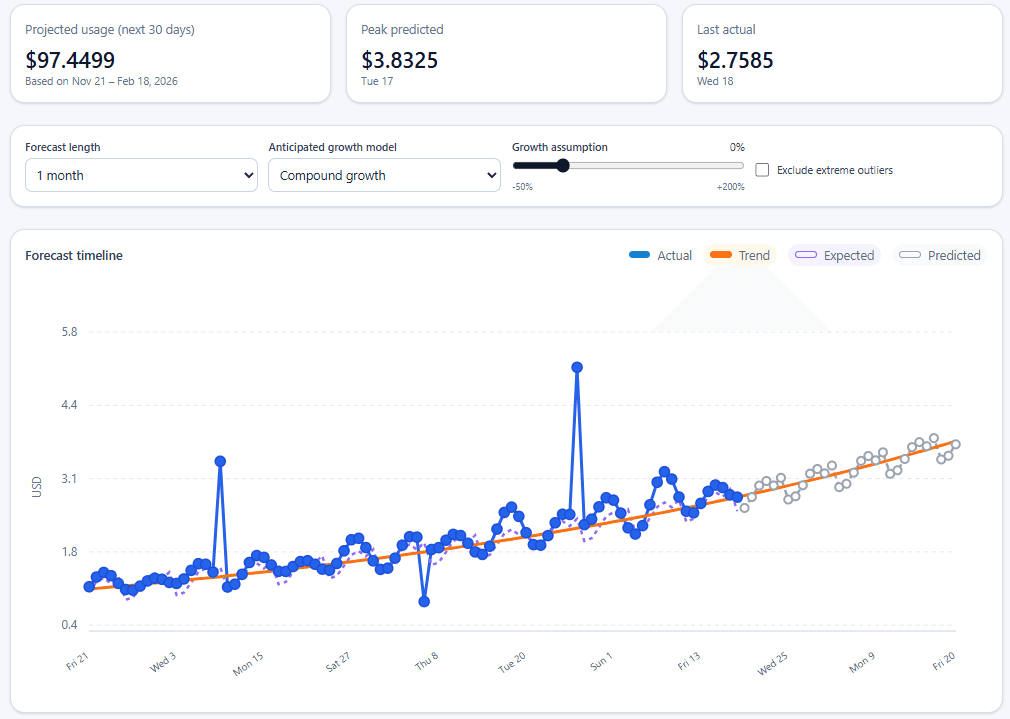
What the forecast looks like
Upload usage/token CSVs
You can upload multiple files. We auto-detect OpenAI vs Anthropic based on CSV headers.
0 usage files selected
Upload cost CSV (optional)
Add cost files after usage files to unlock dollar forecasting from exported spend data (otherwise we estimate dollar cost for various models).
0 cost files selected
Forecast preview
Waiting for CSV uploadUpload usage files to replace this placeholder with your live forecast, anomaly table, and projections.